![corl-logo-color ICON-1.png]](https://knowledgebase.corltech.com/hs-fs/hubfs/corl-logo-color%20ICON-1.png?height=40&name=corl-logo-color%20ICON-1.png)
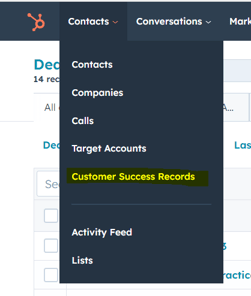
Your customer success records in HubSpot will be the primary source of information regarding your clients. In these records, you will track meetings, calls, notes on the client as well as monitor client health and happiness. To view these records, navigate to the top left where it says contacts and click the drop down option for Customer Success Record.
Next, navigate to the tab that says "Advanced Filters" and click "Add Filter". Select "Owner" and select your name. Then hit "Apply". This will show you a filtered view of only your accounts.
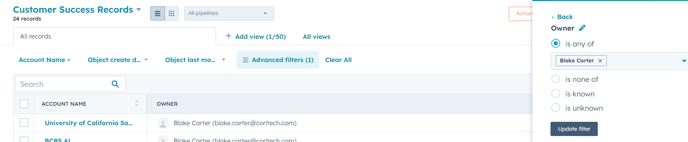
Saving the filtered view for future use:
In order to save this view, exit out of the filters and find the "Save View" button towards the right side of the screen. Hit "Save as new" and name it.

Please note, these views can be made private, shared with everyone, or shared with specific users only.